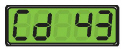
This section addresses the operating requirements for the XtendFRESHTM Controlled Atmosphere option. Operating parameters are not changed except for XtendFRESH settings. For information pertaining to the operation of the refrigeration system, refer to the Operation and Service Manual for your particular model.
The XtendFRESH (FrESh) option is a modular option that offers enhanced functionality to help slow the ripening process of perishable cargo by removing ethylene and simultaneously controlling CO2 and O2 levels in multiple combinations. This enables the fresh transport of perishables on longer voyages. The system’s ability to control the container atmosphere is performed with the use of a CO2 Scrubber and a fresh air vent.
During the scrubbing process, CO2 and ethylene are removed. The scrubber allows for the control of CO2 based on CO2. sensor input. The oxygen is controlled by the cargo’s natural respiration and by opening and closing solenoid operated air vents. An O2 sensor monitors the level of O2 and allows the system to prevent the O2 levels from dropping below the lower setpoint.
While the XtendFRESH option is operating, the process of inducing ripening by introducing ethylene should not be performed.
Pre-trip testing of the XtendFRESH option is performed via function code 43. During the pre-trip inspection, the technician verifies operation by visual observation during this test. Refer to Section 6.10 for more information.
There are two function codes, code 43 and code 44, that assist with XtendFRESH operation. Code 43 contains specific parameters for operation and code 44 provides a visible display of component conditions.
Cd43 is used to select a specific mode of operation and the associated parameters. The modes of operation are: FrESh, OFF, tESt and PUrgE. Within each of these modes of operation are sub menus that have selectable parameters. Not all parameters are available in each sub menu. When setting any mode of operation, the entire process must be followed to ensure all parameters are set.
4.5.1Activate Fresh Mode to Start Up the System
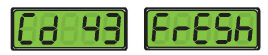
In Fresh mode, all XtendFRESH operations are enabled and setpoints for CO2 and O2 can be edited.
1.Press the CODE SELECT key on the keypad.
2.Press the Up or Down Arrow key until “Cd 43” is displayed, then press the ENTER key. The selection in the right display will blink.
3.Press the Up or Down Arrow key until “FrESh” mode is in the right display, then press the ENTER key.
4.The CO2 setpoint is displayed. “CO2SP” appears in the left display with the setpoint value blinking in the right display. Use the arrow keys to change the setpoint and press ENTER to confirm. Or, just press ENTER to keep the originally displayed value.
The CO2 setpoint is the maximum level of CO2 allowed for the cargo. The range is 0% to 19% in 1% increments, with a default setting of 5%.
5.Next, the O2 setpoint is displayed. “O2 SP” appears in the left display with its setpoint blinking in the right display. Use the arrow keys to change the setpoint and press ENTER to confirm. Or, just press ENTER to keep the originally displayed value.
The O2 setpoint is the minimum level of oxygen allowed for the cargo. The range is from 3% to 21% in 1% increments; the default setting is 10%.
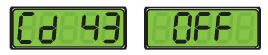
When Off mode is active, all XtendFRESH operations will be disabled. The XtendFRESH vents will be closed and the scrubber will remain off. This will be the default mode anytime a frozen mode of operation has been selected. Whenever a frozen setpoint is selected, the current XtendFRESH setting will be saved.
1.Press the CODE SELECT key on the keypad.
2.Press the Up or Down Arrow key until “Cd 43” is displayed.
3.Press the ENTER key. The selection in the right display will blink.
4.Press the Up or Down Arrow key until “OFF” mode is displayed and then press the ENTER key.
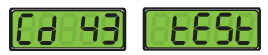
When Test mode is active, the operator has the ability to test system operation of the mechanical components, test and calibrate the CO2 sensor and verify that the O2 sensor is in a valid range.
1.Press the CODE SELECT key on the keypad.
2.Press the Up or Down Arrow key until “Cd 43” is displayed.
3.Press the ENTER key. The selection in the right display will blink.
4.Press the Up or Down Arrow key until “tESt” mode is displayed and then press the ENTER key.
5.After Test mode is selected, “tESt” in the right display will blink. Press the ENTER key as it is blinking to enter the system tests.
During a mechanical test, the fresh air solenoids will open for 8 seconds and then close, followed by the blower fan(s) and scrubber motor turning on for 60 seconds. Visual inspection of each occurrence is required. On units configured to read the scrubber motor output indicator, a message of “Scrub PASS” will be posted if the scrubber motor is rotating. If not, “Scrub FAIL” will appear.
If the unit is equipped with the Vent Position Sensor (VPS) option, you need to manually check the operation of the VPS switch. Refer to Section 6.9.1 for additional information.
During a sensor test, the controller will verify that the CO2 sensor is reading 0% and the O2 sensor is in a valid range. If both meet this requirement, a calibration test “CAL StArt” will be displayed for five seconds, a CO2 sensor calibration will be performed and an O2 sensor validity check will be performed. Then, a ten minute countdown timer is placed in the right hand display.
If both sensors pass, a “CAL PASS” message will display for five minutes or until the user presses and holds the CODE SELECT key for five seconds. In either case, normal operation will be resumed.
If one or both of the sensors are outside of the range, check condition requirements. The failed results will be displayed “No CAL”, alternating every five seconds. To exit, the user should press and hold the CODE SELECT key for three seconds. A “CO2 FAIL” or “O2 FAIL” message will appear if the test fails.
If the range check fails, it indicates a drifted sensor. Verify that the box is clean of cargo remnants from last trip, open the back doors, and rerun the test. If the range check fails a second time, replace the sensor that is out of range.
If the O2 sensor reads 2000 mV or less when flushed with fresh air, the sensor is at the end of its life and needs to be replaced. This value can be viewed in Cd44.
If either of the sensors fail open or shorted, an Alarm 09 for O2 sensor or Alarm 10 for CO2 sensor will occur.
It is required that the calibration procedure only be performed during pre-trip or when the container has been fully vented.
4.5.4Activate or Deactivate Purge Mode
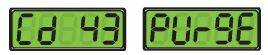
When Purge mode is active, it allows the user to suspend XtendFRESH operations while pre-charging gas levels in the container. All XtendFRESH control actions and alarms 29 and 96 are suspended in order to purge the container to a desired gas concentration. When activated, Purge mode stays active for a period of time selected from the Purge mode sub menu.
Procedure:
1.Press the CODE SELECT key on the keypad.
2.Use the Arrow keys until “Cd 43” is displayed, then press the ENTER key. The selection in the right display will blink.
3.Use the Arrow keys until “PUrgE” mode is displayed, then press the ENTER key.
4.“CO2SP” appears in the left display with the CO2 setpoint blinking in the right. Use the Arrow keys to change the CO2 setpoint and press ENTER to confirm. Or, just press ENTER to keep the originally displayed value.
The CO2 setpoint is the maximum level of CO2 allowed for the cargo. The range is 0% to 19% in 1% increments, with a default setting of 5%.
5.“O2 SP” appears in the left display with the O2 setpoint blinking in the right. Use the Arrow keys to change the O2 setpoint and press ENTER to confirm. Or, just press ENTER to keep the originally displayed value.
The O2 setpoint is the minimum level of oxygen allowed for the cargo. The range is from 3% to 21% in 1% increments; the default setting is 10%.
6.“PUrgE” is now in the left display. Use the Arrow keys to toggle the right display to “On” or “OFF”, then press the ENTER key.
When “OFF” is selected, Purge mode is either not activated or terminated if it was previously activated.
When “On” is selected, “tim” is in the left display with the current purge time flashing (default 5 hours) in the right display. The “tim” value is the amount of time XtendFRESH will be held off to allow charging and settling of gases.
7.Use the Arrow keys to change the time value and press the ENTER key to confirm and enter Purge mode.
8.Purge mode is now active. During Purge mode, while the timer is counting down the display toggles between:
•left display shows “PUrgE” and right display shows how much time remaining.
•left display shows temperature setpoint and right display shows control temperature setpoint.
If there is an alarm in the alarm list, the Purge mode countdown will not be displayed but Purge mode is still enabled.
9.When the Purge mode timer expires, Fresh mode is enabled and the unit reverts to normal temperature control display. Purge mode is terminated on power cycle, trip start, defrost or pre-trip.
10.To view CO2 and O2 values during Purge mode, exit Cd43 by pressing the CODE SELECT key until Cd 43 is in the left display. Then, use the up arrow to bring up Cd44 and press the ENTER key.
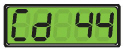
Cd44 allows the user to view the following XtendFRESH values: CO2 setpoint, CO2 percentage, O2 setpoint, O2 percentage, and O2 voltage.
For the CO2 setpoint, the range is from 0 to 19% in 1% increments with a default setting of 5%. For the O2 setpoint, the range is from 3% to 21% in 1% increments with a default setting of 10%.
1.Press the CODE SELECT key on the keypad.
2.Press the Up or Down Arrow keys until “Cd 44” is in the left display, then press the ENTER key.
3.Press the Down Arrow key to toggle between the different values available in this sub menu.
|
|
|
|
|
|
|
|
|
(displayed in mV) |
|
4.7Container Venting Procedure
Potential hazardous atmosphere and low oxygen levels inside the container, ventilate before entering. Stay away from doors while venting. (Refer to Section 4.7)
1.Set the Start-Stop (ST) switch to the “I” position to turn the unit On.
2.Fully open the manual fresh air vent.
Avoid any direct breathing of the venting gases from the air makeup vent.
3.Go to Cd43, select Fresh mode and set the operating parameters to 21% O2. Refer to Section 4.5.1
4.Allow the refrigeration unit to run. This allows the evaporator fans to exchange low-oxygen level air with ambient air.
5.Monitor the container internal environment via Cd44. Refer to Section 4.6.1.
6.When the oxygen level reaches a safe level ~ 20 ± 2%, open both of the container rear doors and pull back the curtain to facilitate the clearing of the hazardous atmosphere. Step away from the container rear doors. Continue refrigeration operation for five minutes prior to entry or unloading of the container.




