November 2012 Issue

Inside This Issue:
Alarm 24 Scroll Compressor IP
In the EliteLINE® & PrimeLINE® units’ scroll compressors, Carrier Transicold uses a 3-phase Internal Protector (IP) embedded in the compressor motor winding that opens two of three high voltage power supply connections to stop the motor when it over-heats. The connections are located at the wye connection within the compressor motor winding.
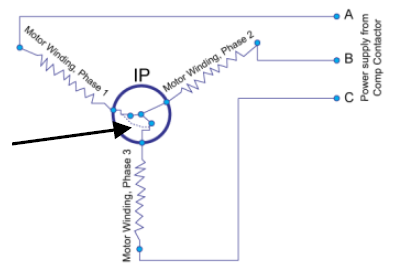
With this, the EL & PL units have different alarm logic than the ThinLINE® unit (TL), where the compressor IP is easily identified on the schematic as part of the compressor’s low voltage circuit.
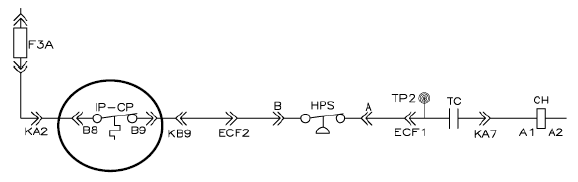
Unlike the TL unit that uses a current sensor with only two sensing outputs, the scroll units (EL & PL), have three sensing output current sensors where the third current sensor is located downstream of the compressor contactor and senses the 3rd leg / Phase C of the compressor (Green circle in the below sketch).
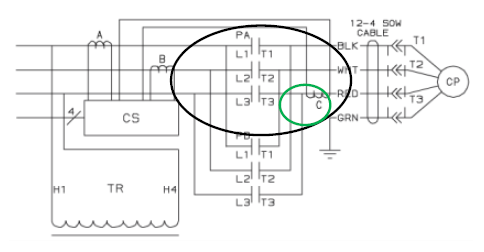
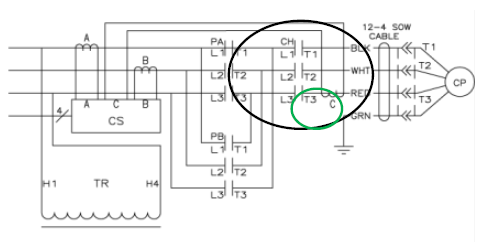
When the compressor contactor is energized and there is no current, the microprocessor senses that the IP is open. The alarm condition will be checked every 5 minutes and will go inactive once current is sensed.
When troubleshooting the AL 24, ensure the current sensor and the compressor contactor are trouble free, as they will also prevent the compressor’s third leg from drawing amperage.
To confirm an open IP, lock out / tag out the unit and ohm between each leg of the compressor at the compressor contactor (PA for EL and CH for PL). An open circuit measured here is an indication of an actual open compressor IP.
When the alarm occurs, the unit will revert to a user- selected failure action of either C (Evaporator Fan Only) or D (All Machinery Off) in the perishable mode or if in the frozen mode of operation D (machinery Off) only.
Genset Battery Charger Troubleshooting
Q. How do I know if my genset battery charger is working?
A. Using a multi meter, place the positive lead on the positive battery post and the negative lead to the negative post of the battery. The meter reading should be greater than 13 Volts DC. If not, then either the battery is suspect or the charger is not working.
When troubleshooting the charger, it is important to check the four fuses inside the housing that protect the circuit board components and circuitry. These fuses also protect the charger from reverse polarity if the battery was to be connected backwards. The fuses can be checked as followed:
Disassembly:
1.Remove charger from unit.
2.Remove the four screws securing the end cover to the housing (end cover containing harnesses).
3.Carefully remove the cover from housing so that you do not damage the perimeter gasket.
4.Remove the wire tie securing the fuses.
5.Remove each fuse and test with the multi meter for continuity.
6.Inspect fuse holder for any signs of corrosion and clean the fuse holder.
7.Replace any blown fuses and reinstall wire tie to secure it in place.
8.Inspect the weep hole to make sure it is clean.
9.Inspect the plastic drain covers (internal and external) to make sure that the holes do NOT line up with each other or the hole in the end cover. (The drain allows for the removal of condensation that may occur within the charger due to the transformer heating and cooling during operation).
10.Re-position gasket and re-assemble end cover.
PCMCIA Card Battery
The 2 MB and 4 MB Select Line™ software cards with replaceable batteries were introduced to complement our rechargeable battery software cards.
•2 MB (p/n 50149-00)* ~ 2 years battery life
•4 MB (p/n 50149-01)* ~ 1.5 years battery life
* These cards are no longer offered by Performance Parts Group. Other alternatives are being evaluated.
Although no longer available, a depleted card battery may give the user a false perception that the card is failing, where in reality; only the battery needs to be changed.
The replaceable battery card comes with a dual back-up battery design, a replaceable, non-rechargeable 3 volt lithium battery and an on-board rechargeable, but non-replaceable, auxiliary battery. The auxiliary battery is for data retention, allowing for the replacement of the main battery without data loss for 20 minutes.
The first attempt to solve any issues with a replaceable battery software card should be:
•Replace the 3 volt lithium battery.
•Reformat the card.
•Reprogram new software to the card.
The replacement battery is an off-the-shelf battery, which should be readily available within your local area.
Fuel Additive
Q. Does Carrier Transicold know of a fuel additive to address engine injector concerns due to poor fuel quality?
A. Carrier Transicold has obtained feedback from the field that a product manufactured by Stanadyne is being used by several customers to address engine injector concerns caused by poor fuel quality.
Listed below are the most current software release versions for operating and working with Carrier Transicold container units. Prior to upgrading units you should seek agreement from the equipment owners.
Scroll (ML2i / 5354, ML3 / 5354)
Recip Unit (ML2i / 5154, ML3 / 5154)
Reciprocating Unit (ML2) – 1207
Controlled Atmosphere – 3114
DataLINE – 2.0
DataBANK – 0513
Menu - 0115
Prior to upgrading units you should seek agreement from the equipment owners. After completing a software upgrade, it is important for the user to check the user selectable controller selection (i.e. defrost setting, set point, etc.)